Taking Control - How Gemma 4 Powers My Local AI Ecosystem
We are seeing a big shift in the AI landscape. As major enterprise companies release new models, they are simultaneously tightening the leash, either completely restricting access to the models or limiting it to a select few partners.
This corporate trend has made the general public feel increasingly excluded from the power of AI. My goal, and the focus of this project, is to reclaim that power by building with local tools and sharing that process.
Not only are some of these models locked down and heavily guard railed, but their API costs can also be very high.
This is a pattern that we all have seen time and time again. To give us the tool, and then take it away or limit access to it.
This is why it’s more important than ever to learn how to introduce AI into your local systems. Not only do you take back your data, but you also control the costs.
Using a model like Gemma 4 allows me to run AI locally and power some of my open-source tools without paying API costs and keeping all of my processes and data on my computer.
In this post, I’ll walk you through some of the different ways that I use Gemma 4 locally.
From using custom interfaces, to building custom agents and front-end applications.
The Shift to Self-Reliance: Why Local AI Matters
The importance of keeping sensitive data on your own machine is critical, especially when it comes to business data or personal records that you may not want to share with the cloud providers.
These providers, might be storing and training on your data and this may be something that you’re just not comfortable with.
One of the main reasons I chose to use local AI models on my machine is to have more control over my data, which might be prototype data I’m exploring. It’s also free for me to run in the comfort of my own home.
Having a local AI setup also allows for deeper modifications where you aren’t limited by a single API endpoint.
And running locally virtually costs nothing, except your own hardware costs.
These days, the power of AI is truly in your hands with open-weight models such as Gemma 4, allowing for a quick throughput and fine-tuning, as well as local development deployment on mobile devices and desktops.
The Foundation: Why Gemma 4 is My Choice for Local AI
The choice is yours when it comes to choosing a local model for your AI stack. But for me, that choice became clearer as I got to test and use a variety of different local models like llama, qwen, nemotron, gpt-oss, and more.
The reason I settled on Gemma 4, is because of the variety of flavors it comes in, as well as the constant support and development it receives.
Gemma 4 Flavors:
- Small Sizes: 2B and 4B effective parameter models built for ultra-mobile, edge, and browser deployment (e.g., Pixel, Chrome).
- Dense: A powerful 31B parameter dense model that bridges the gap between server-grade performance and local execution.
- Mixture-of-Experts: A highly efficient 26B MoE model designed for high-throughput, advanced reasoning.
- Unified: A 12B parameter encoder free model for multimodal tasks, replaced vision and audio encoders with direct linear projections of the input.
Currently, I’m using their quantization-aware model, QAT In the 4B parameter for maximum efficiency on my local hardware.
To learn more about the QAT model, visit Google’s blog post: Gemma 4 QAT models: Optimizing model compression for mobile and laptop efficiency
In this article, I break down how to install LM Studio and run Gemma 4 locally.
This is how I first got started running local models on my computer.
If you are new to setting up AI models, this is a great place to start.
Since using LM Studio, I’ve moved on to using llama.cpp which is a little less hand-holding but it’s faster and the core engine behind what most other wrappers like Ollama and LM Studio use.
Gemma 4 in Action: A Tour of My Local AI Ecosystem
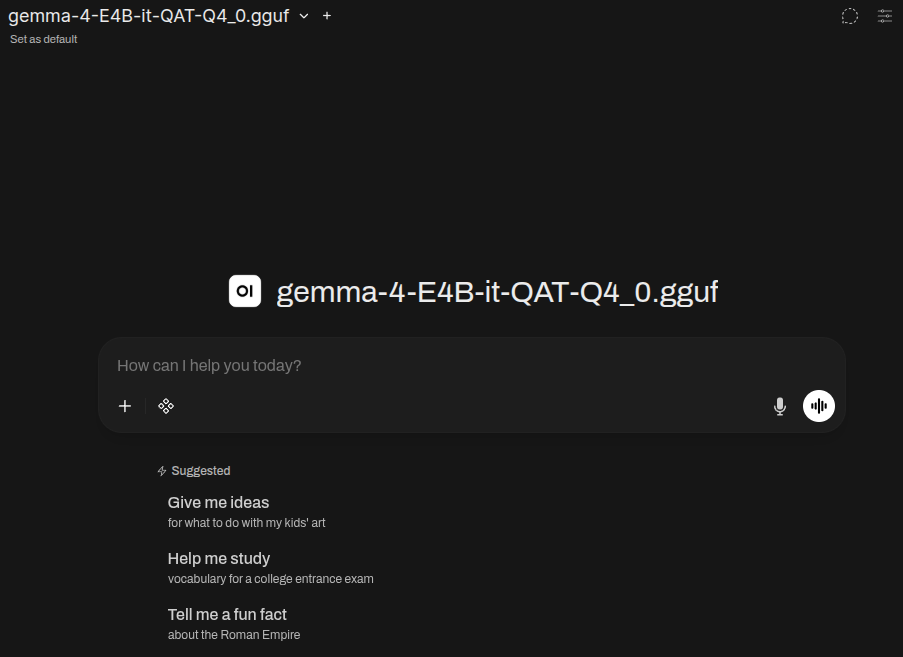
The AI Chat Interface: Open WebUI
For easy day-to-day questions that I may not want to send to an enterprise LLM, I use the Open WebUI interface. It’s easy to set up and has a lot of robust features you can use, including MCP integrations, agents, and users. If you’re familiar with using ChatGPT, then you’ll feel right at home with using Open WebUI.
It’s great for testing prompt ideas, asking questions, keeping logs of your data, as well as discussing prototypes that you may want private.
The Automation Layer: n8n Agents
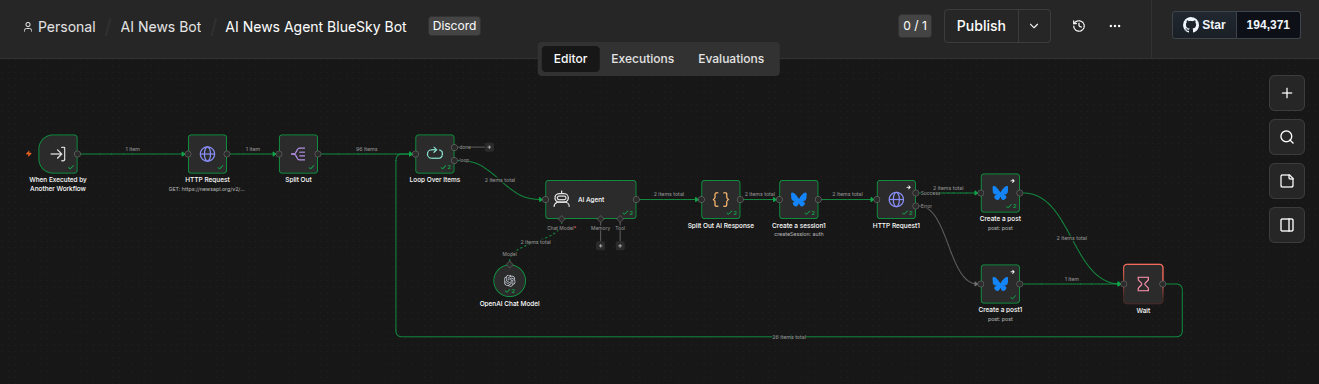
Moving beyond the chat interface, I’m also using Gemma 4 to power automated tasks within n8n by using the AI agent to summarize incoming data, route requests, and trigger some of my complex workflows.
One example of this is my AI news agent bot for Bluesky.
It has been set up to automatically fetch a list of AI posts from an API, and then it will summarize those posts and deliver the post to BlueSky along with relevant hashtags it creates based on the summary.
The Custom Applications: Local Utility (Family Dashboard)
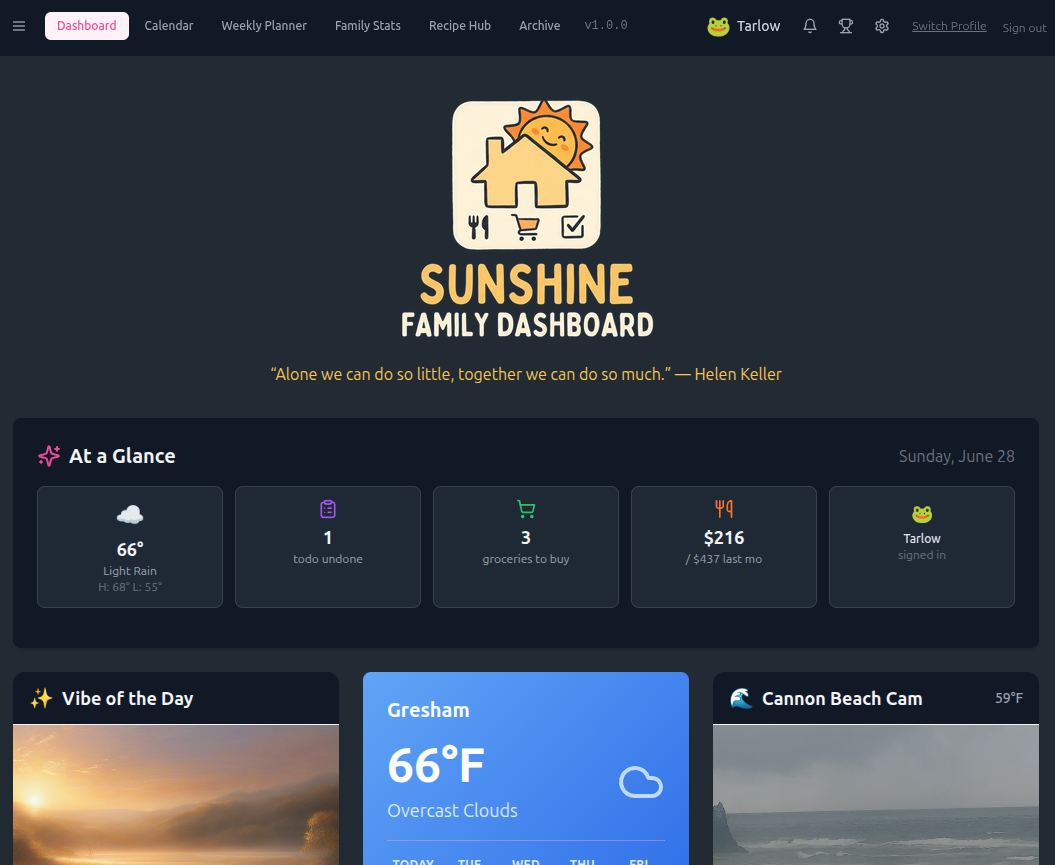
Here is an app that me and my wife use daily. The Sunshine Family dashboard. A place where we can plan meals, take notes, share photos, and stay accountable.
Gemma 4 is integrated to power our meal prep fridge widget by giving us an estimated expiration time for any of the items that were recently put into fridge.
It uses a structured prompt, and the item that was prepped so to give an estimate expiration time to display on the widget.
The Front-End Integration: The Chrome Extension (Social Media)
It takes a lot of time and thought to write a meaningful post.
At times the response may be right at your fingertips, but you may not know how to write that thought or response.
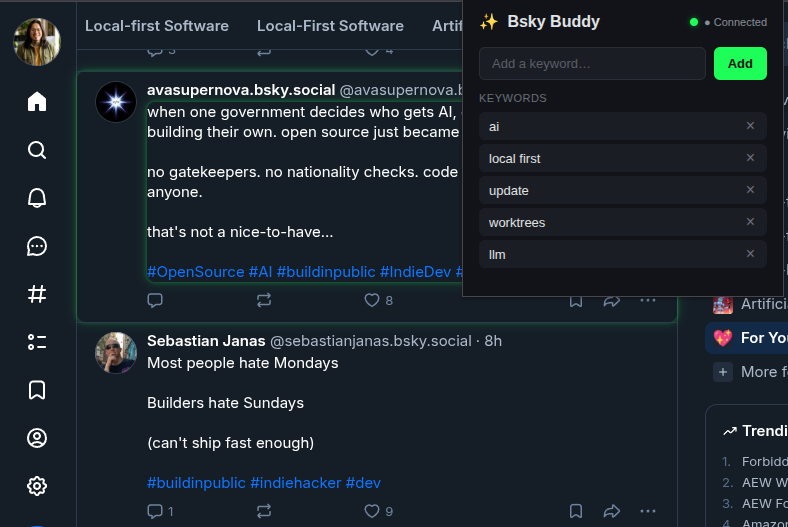
This is why I’m using Gemma 4 to analyze BlueSky and X posts that I want to interact with.
First, it will highlight any post with a green border that uses any keywords I have inserted into the list.
Then it sends off the message to the model and analyzes the intent, then gives me back a tailored response, which I clean up and customize.
Now we are building engagement faster than the speed of thought.
Driving The Machine by Voice: OpenWhispr

Open Whisper is an open-source tool that allows speech to text using local models and your own hardware.
It’s another amazing tool where I’m using Gemma 4 locally to process my speech to text using Open Whispr.
Within milliseconds, it will send off what I say and then return back a clean version without any artifacts.
I’m actually using it right now to write this blog post. Behind the scenes, Gemma 4 is cleaning up an um’s, and stutters I make.
The Reality Check: What I Wish I Knew Before Starting
When you’re first starting out, it could feel overwhelming because there are so many models to choose from, so many different applications to set up and use, and a lot of new terminology.
My advice would be to take it slow. Start out with one application like LM Studio and get a good feel on how to run, download, and test models.
Once you feel you’ve got a good grip on LM Studio, move forward with setting up automated workflows that utilized Gemma 4.
What I learned is that it’s a constantly evolving process where you’ll need to take on and understand new tools, models, and applications.
Don’t be afraid to dive headfirst into setting up and testing local workflows and tools.
Refine the process, and you’ll find what works for you.
The Question Isn’t What AI Can Do? But What We Can Build?
Putting Gemma 4 to work and seeing it in action has been amazing. It’s not just about having a faster way to generate a social media post; it’s about having a powerful private partner that works exactly how you want it to.
It’s easy to guide and steer, whether you want to automate mundane tasks or build a unique application that uses AI responses.
The barrier to entry for local AI is lower than ever.
The question really isn’t what AI can do for us? but what we can build with AI.
What will you build? Automate? Or use local AI for?
The possibilities are endless.
Related Posts
How to Install LM Studio and Run Gemma 4 Locally for Private LLM Use Why Local LLMs Matter (Privacy & Control) Having peace of mind that you are the one in control of your data is really a liberating feeling. And one of the most freeing aspects of running your own LLM…