Project Talk - SkyBuddy - Posting on Bluesky Faster Than The Speed of Thought
There I was, looking through my feed on Bluesky and I found a few posts I wanted to reply to but didn’t know the best way to reply…
I wanted to engage with the user, but didn’t have the right words to say.
I wanted to reply with something that not only sounded good, but also offered engagement, was intellectual, or even made the user smile.
That’s when I thought:
“Why don’t I have a magic reply button that will curate a reply using my already running local Gemma 4 model and put it in the reply box for me. I can just manually tune/adjust it after the paste and use system prompts to tune the replies”
With the idea planted and my recent experience with making another filtering tool for Reddit (I will write up a blog post about soon).
I set the plans in motion to build “SkyBuddy”.
What is SkyBuddy?
Put simply, SkyBuddy is a Chrome Extension for the social network, Bluesky: It can Highlight, filter, and stage replies to posts using your local LLM.
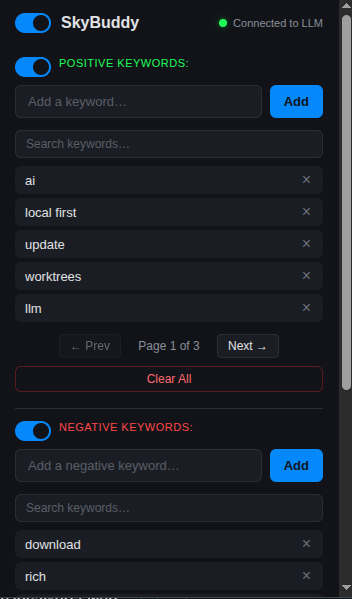
Keyword filtering screenshot:
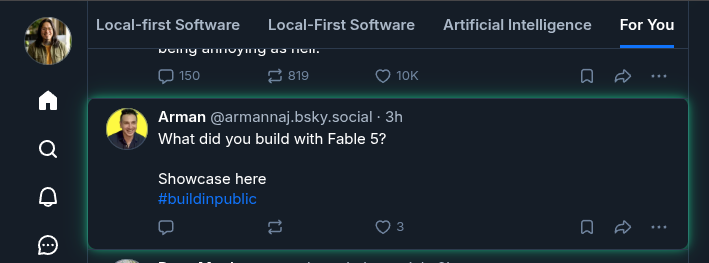
Post matching one of my positive keywords:
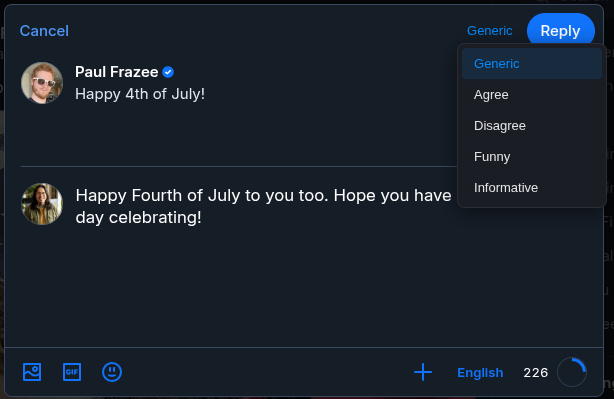
Showcasing the “Magic Reply” button and tones.
Why Was SkyBuddy Made?
It was made so I can easily spot which posts to reply to by using a positive keywords list and it also hides posts I am not interested in seeing with a negative keyword list.
When I find a post I want to reply to, I click on the reply button and then I can see the new “Magic Reply” button. Then I choose the tone I want to respond with: Generic, Agree, Disagree, Funny, Informative. Each tone has it’s own system prompt for the local LLM.
This takes away a lot of the thought process that comes along with curating a thoughtful reply.
I can just focus on cleaning up the context and adjusting or adding anything I would like, then post it.
Now, I get a cleaned up Bluesky feed. Highlighted posts that match the keywords I am interested in. And, a thoughtful response to a post I was interested in.
It allows me to engage faster, browse faster, and spend less time on social media. Which is always a good thing, right?
It’s Still In Development, But You Can Use It Now.
While the core functionality is working and live, the project is not finished.
My next focus is on refining the prompt engineering for each tone and optimizing the local LLM integration for speed and efficiency.
Right now, the replies are not 100% where I want them to be but a good base for anyone to start using them.
Once I am finished tuning the prompts and putting some finial polish on, I will submit the extension to the Chrome Web Store.
For now, you can check out the full project write up here: SkyBuddy
Or get the repo over at GitHub: https://github.com/DevTarlow/SkyBuddy
Until next time,
Keep building!
~ Tarlow