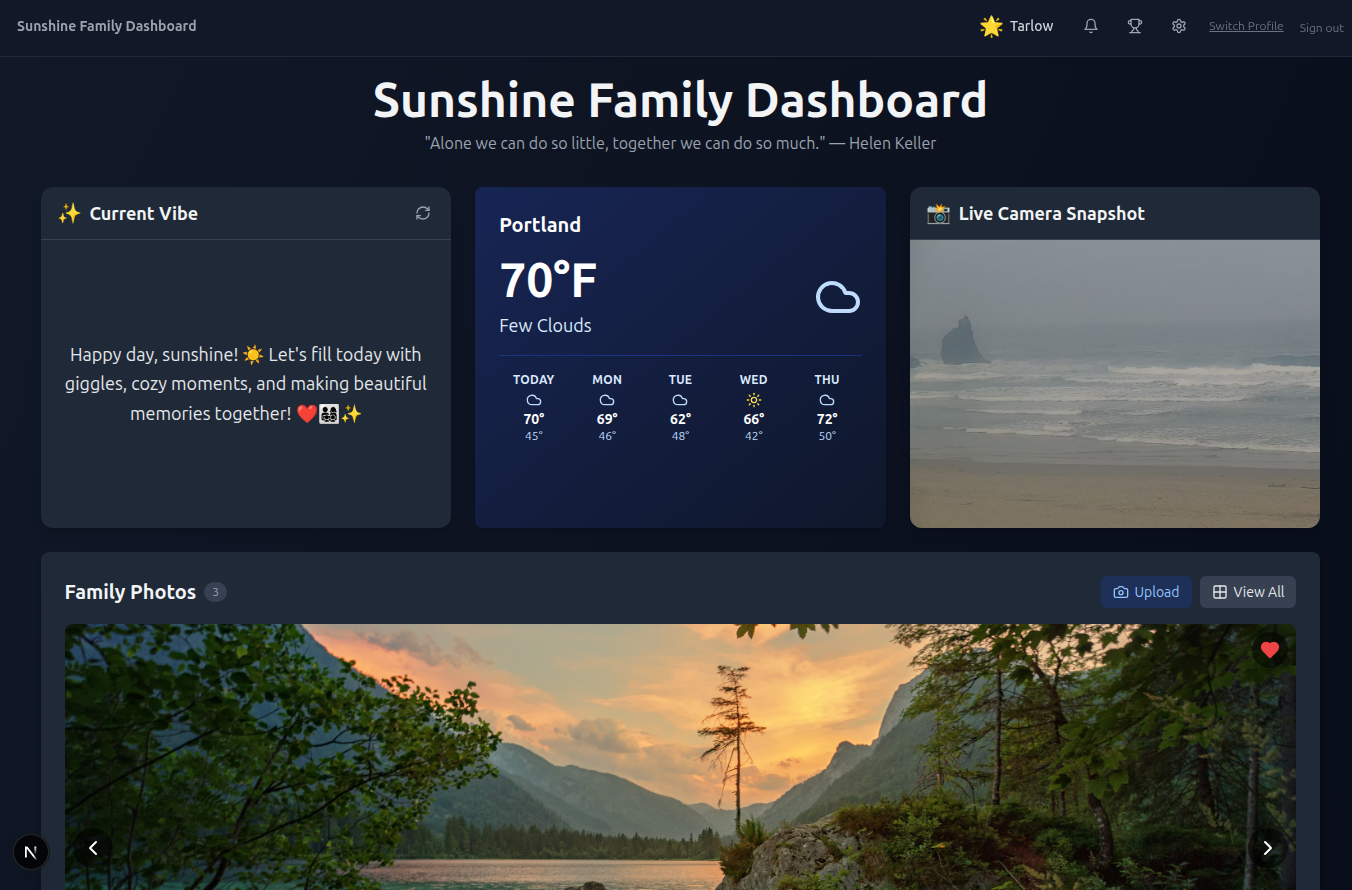
Sunshine Family Dashboard - Web App
- #local-dashboard
- #family-hub
- #local-ai
- #nextjs
- #home-automation
- #meal-planner
- #recipe-hub
- #calendar
- #stats
- #pwa
The Sunshine Family Dashboard is a local-first web app that brings your family’s entire week into one place. Packaged in a single Docker container and built with Next.js and SQLite, it handles meal planning, recipe bookmarking, shared grocery lists, daily todos, fitness tracking, dining-out costs, sticky notes, and a whole lot more.
Version 2 brings a ton of new tools: a monthly event calendar, a full weekly meal planner, a recipe hub that fetches metadata automatically, family-wide stats with charts, a searchable archive, and an at-a-glance summary. The dashboard also uses your local LLM to generate unique recipe ideas, custom toast alerts, and a vibe of the day, all processed offline through your own machine.
Built with privacy in mind, Family Dashboard requires no cloud databases or subscriptions and runs entirely on your own local network, ensuring your family’s data stays fast, secure, and 100% yours.
This is something my wife and I use daily, so I figured some of you may too. Give it a try!
New in v2 is the Recipe Hub. Save recipes from anywhere, just paste a link and the dashboard automatically pulls in the title, description, image, and other metadata. You can rate recipes, search by category, and sort by featured. It’s become our family’s shared cookbook.
What makes it click, though, is how it ties into the new Weekly Meal Planner. When you’re filling out breakfast, lunch, or dinner for any day, you can @-mention a saved recipe to link it directly. So when my wife plans “Chicken Tikka Masala” for Tuesday, the kids can tap through and see exactly what’s on deck. Week navigation lets you scroll backward through past weeks or plan ahead, something we use every Sunday.
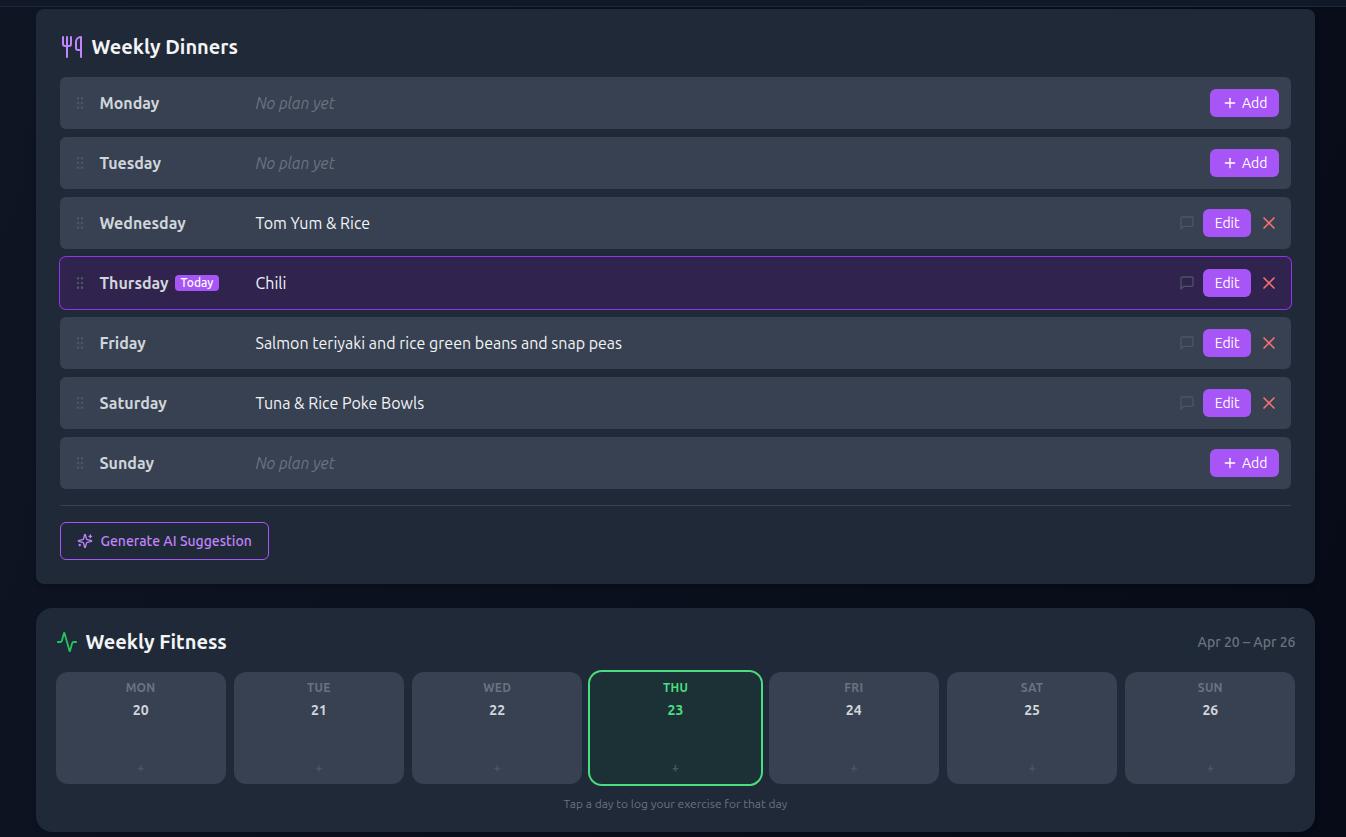
One of my favorite features of the dashboard is the Weekly Dinners section. You can keep track of what’s for dinner so the whole family knows what’s for dinner! You can also drag to rearrange dinner days or leave comments.
Get a little boost of inspiration with the Weekly Fitness tracker where you can easily log the days you did your workout, get achievements, and inspire the other members in the family.
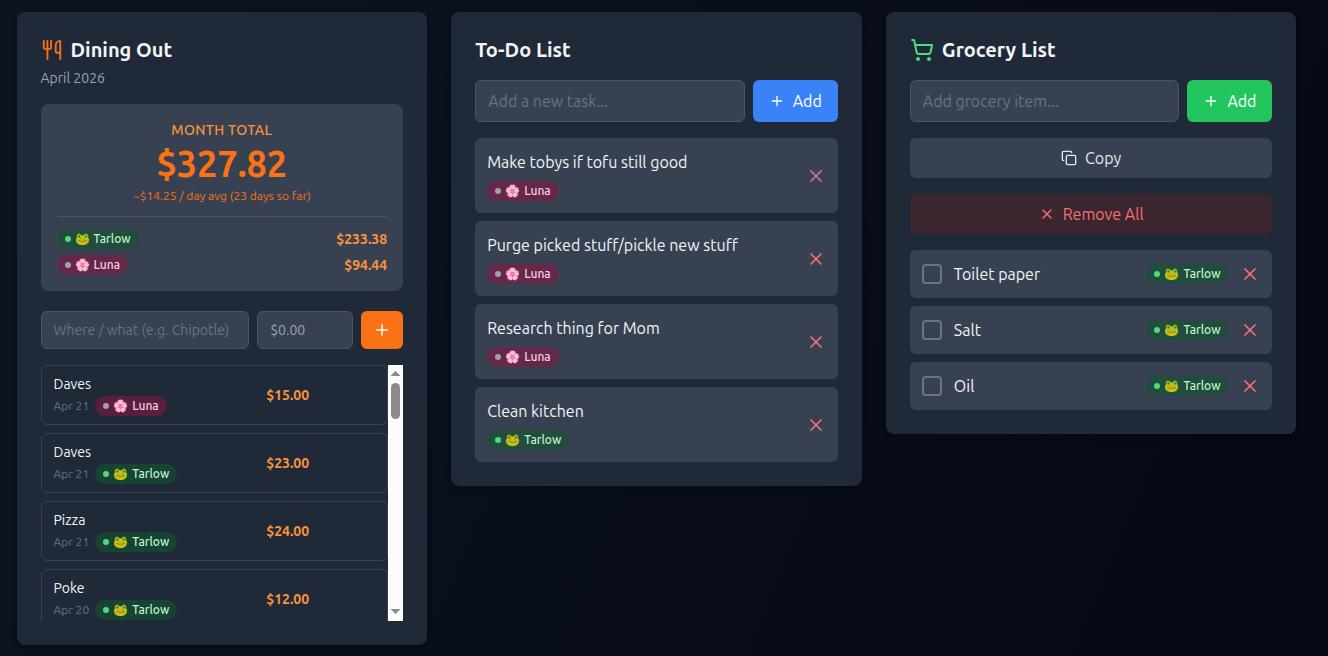
The Dining Out section lets you track the total amount you are spending on eating out each month. You can also see how much each family member is spending, this helps keep everyone accountable and shed some light on how much you are spending each month eating out.
Need to keep track of things to do? Use the To-Do List to log your tasks and simply remove them when you are done to get a fun message. Tasks can now have optional daily, weekly, or monthly reminders so nothing slips through the cracks.
The Grocery List section is there to help you remember those items you needed to pick up on your next shopping trip. Items can be grouped by category with color-coded badges, and you can even create your own custom categories. Simply add items to the list and copy them over to your favorite on-the-go app. I like to use Google Keep for my shopping notes (easy to check off and copy my whole list over)
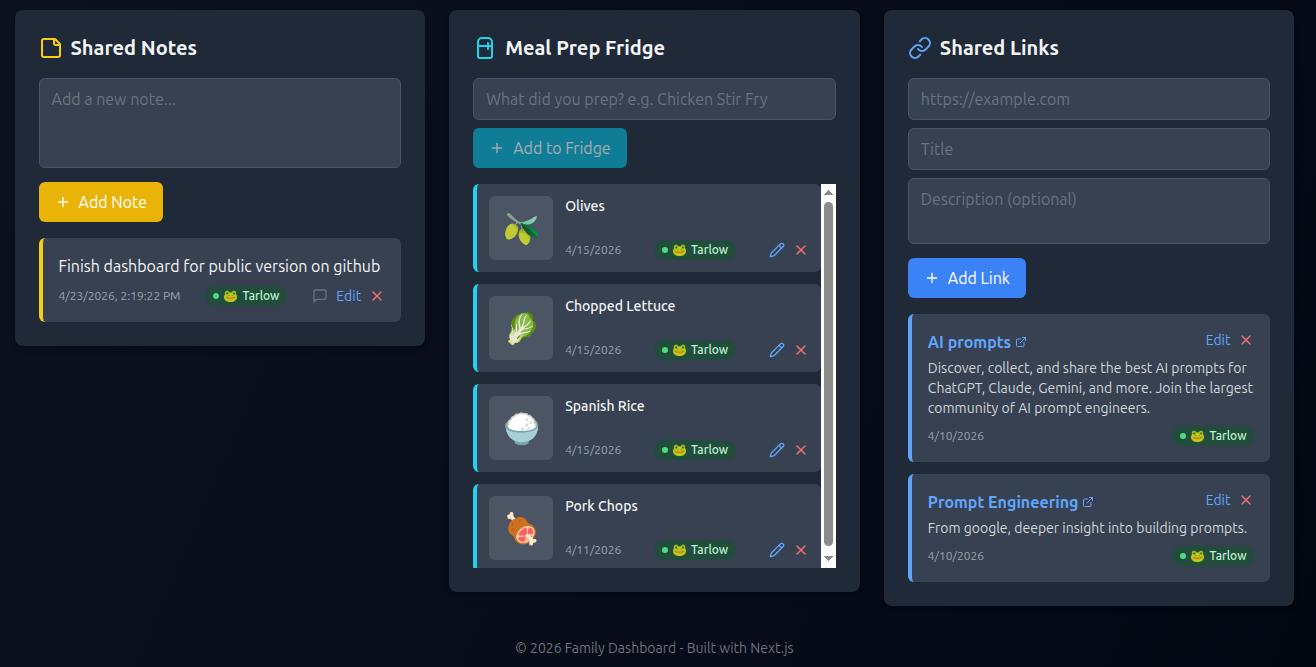
Have something you want the whole family to know? Add it to the Shared Notes panel for everyone to see.
The Meal Prep Fridge panel is another favorite of mine. Here is where you can log what you just prepped and put into the fridge. It will fetch a related emoji, log the date, and name of the item you prepped. Great for seeing what’s in the fridge without having to walk over.
Similar to the shared notes panel but offering more options for links I added the Shared Links panel. This is where you can share important web links with the whole family.
Lots of features can be adjusted through the settings panel, accessed by clicking the cogwheel icon in the top navigation.
The new Calendar gives us a shared monthly view with color-coded events. Each family member gets their own accent color (pick from 12 in settings), so birthdays, appointments, and school events are easy to spot at a glance. Add, edit, or delete events right from the dashboard.
For the numbers-minded, the Family Stats page shows aggregate charts — monthly bar graphs tracking dining-out spending, workout days, todos completed, and photo uploads. The dining-out widget now also shows a month-over-month comparison so you can see if you’re trending up or down.
An Archive page lets you browse and search archived notes, deleted todos, and cleared meal prep items. And if you want a quick pulse-check, the At-a-Glance summary pulls together weather, open todos, grocery items, upcoming events, and expiring meal prep all in one widget-ready view.
The dashboard also got a navigation overhaul: a proper desktop navbar with slide-out sidebar, a mobile bottom tab bar with overflow menu, and multi-page routing. It’s now a PWA — installable on any device with offline support and its own app icon. A full data backup/restore system lets you export your entire database as JSON and import it anytime giving you peace of mind when you’ve got years of family data in there.
Features
- Local member login / profile with per‑member theme, background, and accent color (12‑color picker)
- Monthly Calendar with color‑coded events, add/edit/delete
- Weekly Meal Planner — breakfast/lunch/dinner slots per day, week navigation, recipe @‑linking
- Recipe Hub — bookmark recipes with auto‑fetched metadata (title, description, image), ratings, categories, search, and featured sorting
- Weekly dinner planner with AI suggestion, drag‑to‑reorder, and comments
- Fitness tracker with weekly log and achievements
- Dining‑out expense tracker with monthly totals, per‑member breakdown, and month‑over‑month comparison
- To‑do list with optional daily/weekly/monthly reminder intervals
- Grocery list with categories, color‑coded badges, grouped display, and custom category CRUD
- Shared notes with comment threads
- Meal‑prep fridge with LLM‑generated best‑by window
- Shared links board
- Family Stats page with aggregate monthly bar charts (dining, workouts, todos, photos)
- Archive page — browse archived notes, deleted todos, and deleted meal prep items with search
- At‑a‑Glance summary — weather, todos, groceries, upcoming events, expiring meal prep
- Weather widget (OpenWeatherMap API)
- Vibe‑of‑the‑Day AI message generated by your local LLM
- Live Camera Snapshot (auto refreshes)
- Photo carousel with favorites, gallery, and upload
- Achievements system
- Unread badges for new items and comments
- Panel visibility controls per member — show/hide individual dashboard widgets
- Desktop navbar + slide‑out sidebar, mobile bottom tab bar with overflow menu
- Multi‑page routing
- PWA support — service worker, manifest, icon, installable on any device
- Dark/light mode per member
- Adjustable auto‑refresh timer
- Data backup/restore — export/import entire database as JSON
Tech Stack
I built this project from the ground up using modern tools and AI, allowing me to focus on features rather than fixing bugs.
Speed & Architecture: The foundation is Next.js 15, giving the app blazing-fast performance whether it’s loaded initially or when interacting with data.
Reliability First: Everything is wrapped in TypeScript. This means I catch mistakes before they reach the user, making the whole experience incredibly stable and predictable.
Design Flow: I use Tailwind CSS for styling—it lets me build beautiful, fully responsive designs with unmatched speed, from concept to finished product.
Data Handling: Our back-end logic is managed by Prisma, a powerful ORM that makes talking to the database (SQLite) feel safe and simple, all while keeping our code perfectly typed.
Effortless Access: Forget passwords! I implemented a smooth, cookie-based member session system designed for instant, hassle-free user onboarding.
Local AI Integration: To keep your data private and ensure maximum speed, I integrated local Large Language Models (LLMs). This means the AI processing runs directly within your environment, keeping your information secure, offline-capable, and giving you a truly autonomous experience without relying on external cloud APIs/storage.
Recent Updates:
- 6/27/2026 | Git Hub v2.0.0 — Calendar, Weekly Planner, Recipe Hub, Stats & More
- 4/26/2026 | Git Hub Initial 1.0.0 release.
Get the Project
Sunshine Family Dashboard is free to use.
Download it from GitHub and run it on your own server.
View on GitHub