My Parrot - Web App
- #kokoro
- #local-ai
- #python
- #tts
- #offline-tools
- #audio
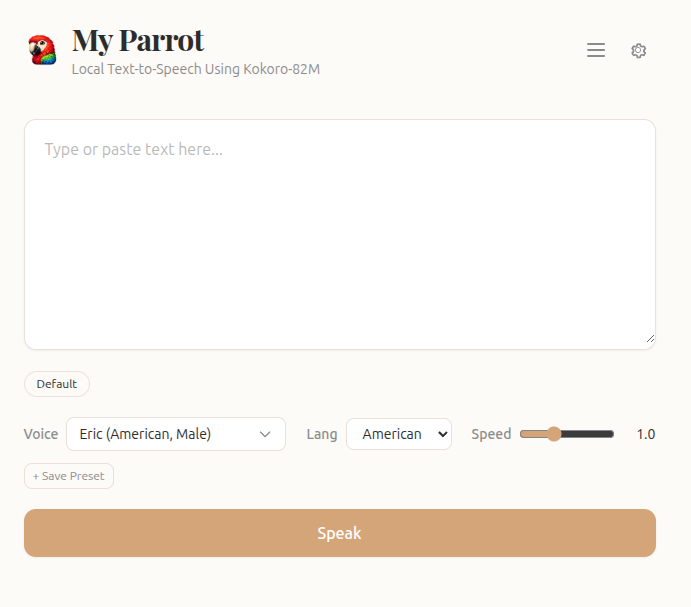
My Parrot is a local-first web UI for the Kokoro-82M text-to-speech model.
You type or paste text, choose from 28 voices across American and British English, and get instant synthesized speech with real-time progress streaming.
Everything runs on your own machine - no cloud services, no API keys, no word limits, no subscriptions.
It started because I needed a way to proofread my blog articles by listening to them.
Every online TTS service I tried capped me at a few thousand words or wanted a monthly fee.
I wanted something that Just Works - unlimited, fast, and completely private.
My Parrot pairs the Kokoro-82M model (one of the most natural-sounding lightweight TTS architectures available) with a clean, single-page UI. The model auto-detects CUDA if you have a GPU and falls back to CPU. Audio is generated in real-time with phrase-level progress via SSE streaming.
The Voice Dropdown gives you 28 voices to choose from - 11 American female, 9 American male, 4 British female, 4 British male. Each voice has a preview button that plays a 2-second sample so you can hear it before committing. The language selector switches between American and British English, and the speed slider ranges from 0.5x to 2.0x.
Below the textarea is the Presets Bar. You can save your favorite voice/speed/language combos as named presets. They show up as pills under the input, and clicking one instantly restores that configuration.
As My Parrot generates audio, a Progress Bar shows real-time phrase-level feedback via SSE events: “Generating phrase 2 of 5…”.
Once the audio is ready, the WaveSurfer Player loads and auto-plays the result. A waveform visualization shows the audio, with play/pause toggle and a time display. A download button lets you save the WAV file.
The History Sidebar slides in from the right with every generation you’ve ever made. Each entry shows the text snippet (80 characters), the voice used, and the duration. You can play, download, or delete individual items. There’s full-text search, a voice filter that populates dynamically, and sort options; newest, oldest, longest, shortest. Deletion has a 5-second undo via toast so you can’t accidentally lose something.
The Settings Modal (gear icon in the header) lets you toggle dark mode, control auto-play behavior, and set the max history cap from 50 to Unlimited. There’s also an expandable About section that shows system info: Python version, PyTorch version, CUDA state, and GPU model.
Features
- 28 natural-sounding voices - American and British English, male and female
- Real-time SSE streaming with phrase-level progress feedback
- WaveSurfer audio player with waveform visualization, play/pause, and time display
- History sidebar with search, voice filter, and sort (newest, oldest, longest, shortest)
- Undo-able deletion with 5-second grace timer and toast action
- Voice presets - save and restore favorite voice/speed/lang combos
- Speed control - 0.5x to 2.0x in 0.1 steps
- Voice preview - 2-second sample for every voice
- Dark mode with persisted preference
- Auto-play toggle
- Configurable max history (50, 100, 200, Unlimited)
- Ctrl+Enter / Cmd+Enter keyboard shortcut
- Download button on every audio clip
- Model status indicator with loading spinner on startup
- System info page with Python, PyTorch, CUDA, and GPU details
- Clean, responsive vanilla JS frontend with Tailwind CSS
- No cloud dependencies, no API keys, no subscriptions, no data leaving your machine
Tech Stack
I built My Parrot with simplicity and local-first principles in mind, avoiding unnecessary framework complexity.
Model & Inference: The Kokoro-82M TTS model delivers some of the most natural-sounding speech for its size. It runs on a single consumer GPU (or CPU) and produces high-quality 24kHz mono audio. The model auto-downloads from HuggingFace on first run and then stays local forever.
Backend: The app is powered by FastAPI, providing SSE streaming for real-time progress updates. Audio generation runs in a background coroutine, streaming each synthesized phrase as it finishes. The backend manages the full model lifecycle - lazy-loading on first request, pre-warming on startup, and graceful shutdown with CUDA cache clearing.
Audio Pipeline: KPipeline handles sentence-boundary detection and splits long text into phrases, generating audio chunk by chunk. Chunks are concatenated into numpy arrays and written as 24kHz mono float32 WAV files using soundfile.
Frontend: The entire UI is vanilla HTML, CSS, and JavaScript - no React, no Vue, no build step. Tailwind CSS via CDN handles styling. WaveSurfer.js provides the waveform player. It’s a single HTML file served directly as a FileResponse.
Storage: Audio files live in ~/.myparrot_audio/ as standard WAV files. History is a flat history.json file - no database, no ORM, no complexity.
Recent Updates:
- 7/3/2026 | GitHub v1.0.0 - Initial public launch with full SSE streaming, 28 voices, presets, history, and dark mode.
Get the Project
My Parrot is free and open source under the MIT license.
Download it from GitHub and run it on your own machine.
You just need Python and a GPU (or CPU - it works either way).
View on GitHub